LetsCodex0%
Loading the migration studio…
Skip to content
LetsCodex
ServicesWorkBlogProcessToolsPricingTeam
Book audit
ServicesWorkBlogProcessCMS pickerToolsPricingTeamBook a migration audit
LetsCodexLetsCodex
LetsCodex

We migrate growth teams off WordPress to Next.js + a headless CMS.

Next.js · Sanity · Strapi · Payload CMS

Services

WordPress → Next.jsHeadless CMS + Next.jsFigma → Next.jsCMS pickerProcess

Company

WorkBlogPricingTeamPrivacy policy

Contact

hello@letscodex.comBook a migration audit
© 2026 LetsCodexHeadless migration for growth-focused teams
Home/Blog/Persist Save Form Data into Google Sheets Using Next.js
Legacy migration
DevelopmentJune 15, 2023Updated June 28, 20269 min read

Persist Save Form Data into Google Sheets Using Next.js

In this article, we'll walk through creating a contact form in Next.js and storing submissions in Google Sheets with a clean Apps Script flow.

Jaam AsadWeb Developer
Saving Next.js form data into Google Sheets

This was one of the older ranked tutorials on the site. The core search intent is still useful: developers want a lightweight way to capture form submissions without standing up a full backend.

Next.js to Google Sheets tutorial header image

App register for Google Sheets

  1. Go to Google Developers Console and sign in with your Google account.
  2. Create a new project from the project switcher.
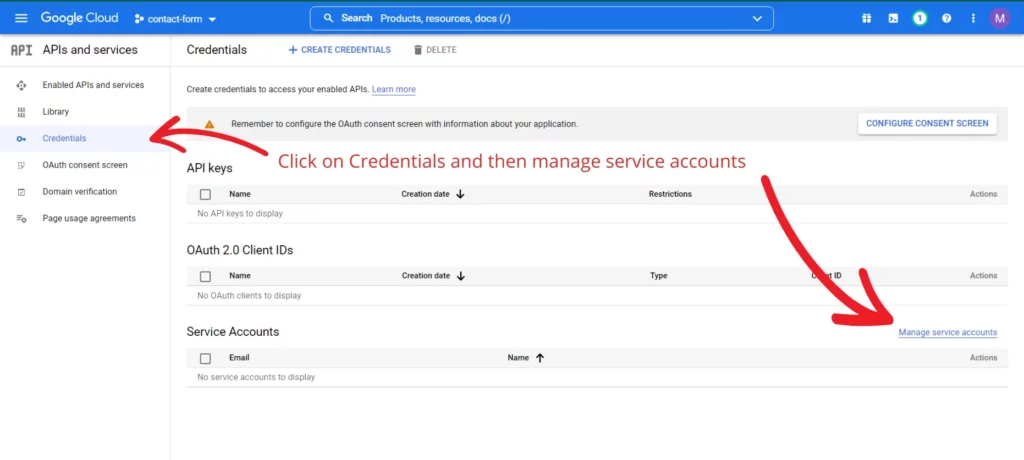
  3. Open Credentials and then manage service accounts.
  4. Create a service account and finish setup.
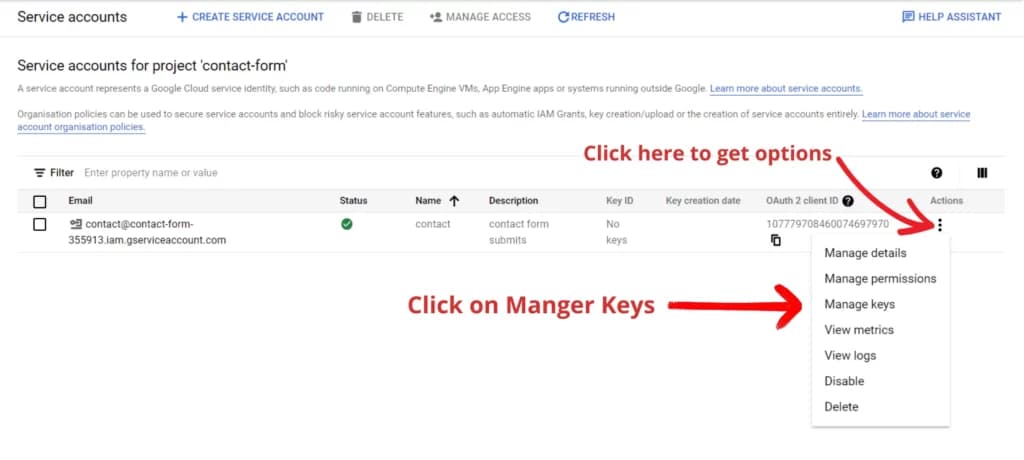
  5. Open the service account menu, then create and download a JSON key.
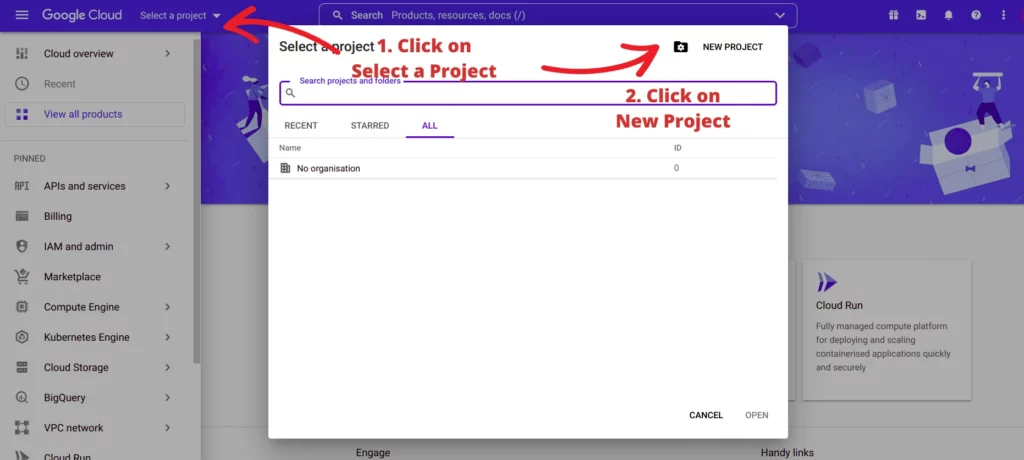
Creating a new Google Cloud project
Opening credentials and service accounts
Managing service account keys
json
{
  "type": "service_account",
  "private_key": "-----BEGIN PRIVATE KEY-----\n...\n-----END PRIVATE KEY-----",
  "client_email": "service-account@example.iam.gserviceaccount.com"
}

Create the Google Sheet

  1. Create a new Google Sheet in the same Google account.
  2. Save the spreadsheet ID from the URL.
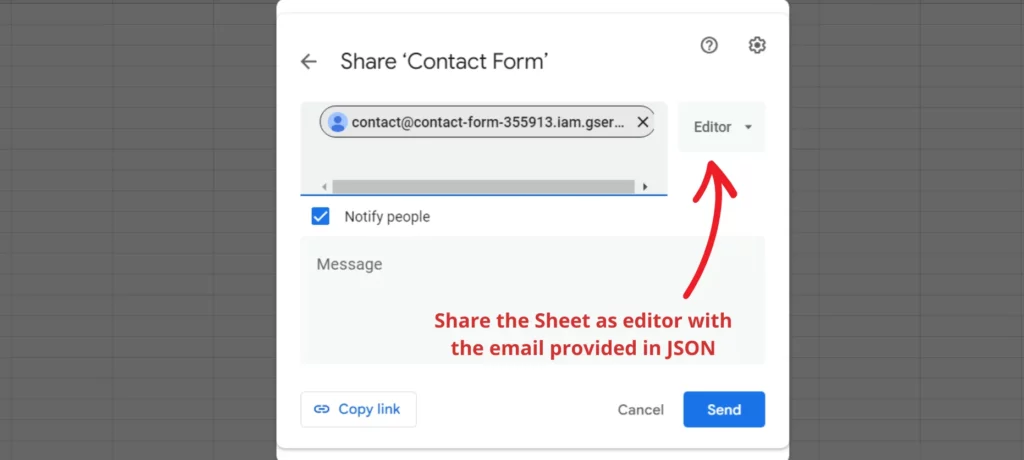
  3. Share the sheet with the service account email as an Editor.
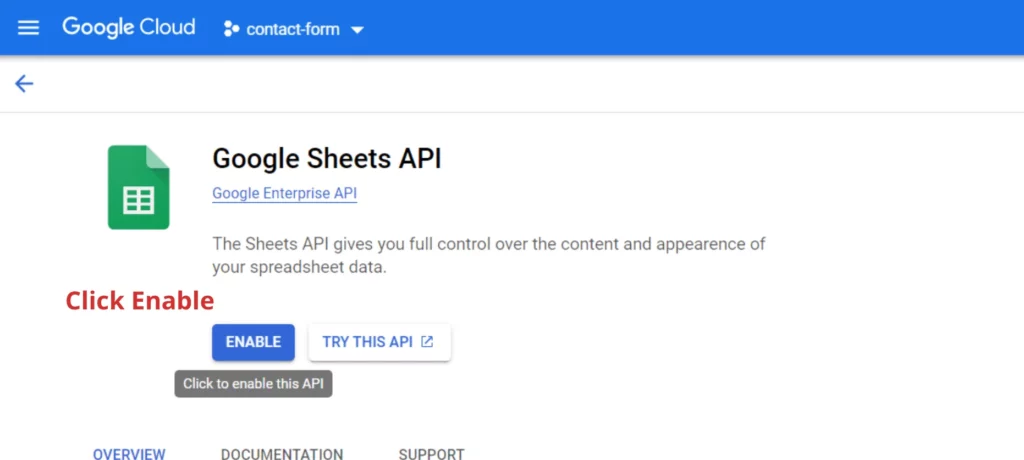
  4. Enable the Google Sheets API in the Cloud project.
  5. Add the field names as the first row headings in the sheet.
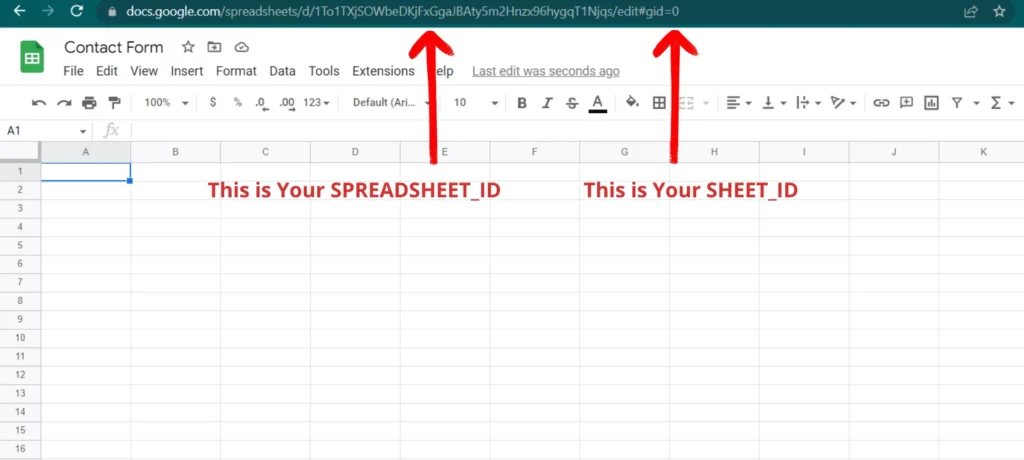
Finding spreadsheet and sheet IDs
Sharing the spreadsheet with the service account
Enabling the Google Sheets API

Build the form in Next.js

bash
npx create-next-app next-js-contact-from-google-sheet
# or
yarn create-next-app next-js-contact-from-google-sheet

The original article used a simple contact form with Full Name, Email, Topic, and Description fields. The form state was handled in React and then posted to a backend handler.

tsx
import React, { useState } from 'react';

const ContactForm = () => {
  const [form, setForm] = useState({
    name: '',
    email: '',
    topic: '',
    description: '',
  });

  const submitForm = (e) => {
    e.preventDefault();
  };

  const handleChange = (e) => {
    setForm({
      ...form,
      [e.target.name]: e.target.value,
    });
  };

  return (
    <form onSubmit={submitForm}>
      {/* form fields */}
    </form>
  );
};

Operational advice

  • Keep credentials server-side only.
  • Validate and sanitize payloads before writing rows.
  • Use Sheets for lightweight workflows, not as a long-term application database.
  • Add spam protection before publishing the endpoint.

Keywords
nextjs google sheetssave form data to google sheetsgoogle apps script nextjs form
Need help?

Need a form workflow that scales beyond spreadsheets?

We can wire forms into the right backend, CRM, or CMS without losing the lightweight editorial workflow your team needs.

Book a migration audit
FAQ

Common questions

01

Should I send form submissions directly from the browser to Google Sheets?

No. A server-side validation step is safer because it protects credentials, filters spam, and lets you control the payload.

02

When should I move beyond Google Sheets?

Once submissions become business-critical, high-volume, or need structured workflows, move to a real database or CRM integration.

Continue reading

Related posts

Editorial cover image showing a WordPress to Next.js migration workflow with redirects, content modeling, and performance planningWP -> Next
Migration8 min read

WordPress to Next.js Migration Checklist for Marketing Sites

A practical migration checklist for moving a marketing site from WordPress to Next.js without breaking rankings, forms, or publishing workflows.

May 12, 2026Read →
Editorial cover image showing technical SEO guardrails for a headless replatform with canonicals, schema checks, redirects, and monitoringSEO Guardrails
SEO7 min read

Technical SEO During a Headless Replatform: What Cannot Slip

The SEO controls that matter most when replatforming from WordPress to a headless stack, from canonicals and redirects to schema and crawl parity.

April 3, 2026Read →
Next.js and React.js comparison graphicNext vs React
Development8 min read

Next.js vs React.js in 2025 - Which One Should You Learn?

A clear comparison of React.js and Next.js in 2025, including when to choose each, performance considerations, and learning-path advice.

August 18, 2025Read →
Next step

Need a form workflow that scales beyond spreadsheets?

We can wire forms into the right backend, CRM, or CMS without losing the lightweight editorial workflow your team needs.

Book a migration audit ↗See our work